
Invoice Amount Analysis
Exploratory Regression (Excel)
Project Context
This project explores whether simple operational variables in Accounts Payable can help explain or predict invoice amounts. Using a simulated but realistic AP data (14,756 invoices), I built a regression model in Excel’s Analysis ToolPak and visualised the results in Power BI.
This was my first modelling project, created as part of my data analytics learning journey.
Dataset
Variables used in the model:
| Variable | Description |
|---|---|
| InvoiceAmount | Target variable |
| ProcessingDays | Number of days required to process the invoice |
| DelayedFlag | 0 = on time, 1 = delayed |
| Category | Department category (visualisation only) |
Regression Model
I used Excel’s Analysis ToolPak to run a simple linear regression with two predictors:
- ProcessingDays
- DelayedFlag
Regression Output (Excel)
- R²: 0.06
- Adjusted R²: 0.06
- Standard Error: 1558.95
- Observations: 14,756
Coefficients
- Intercept: 530.66
- ProcessingDays: –0.734
- DelayedFlag: +874.788
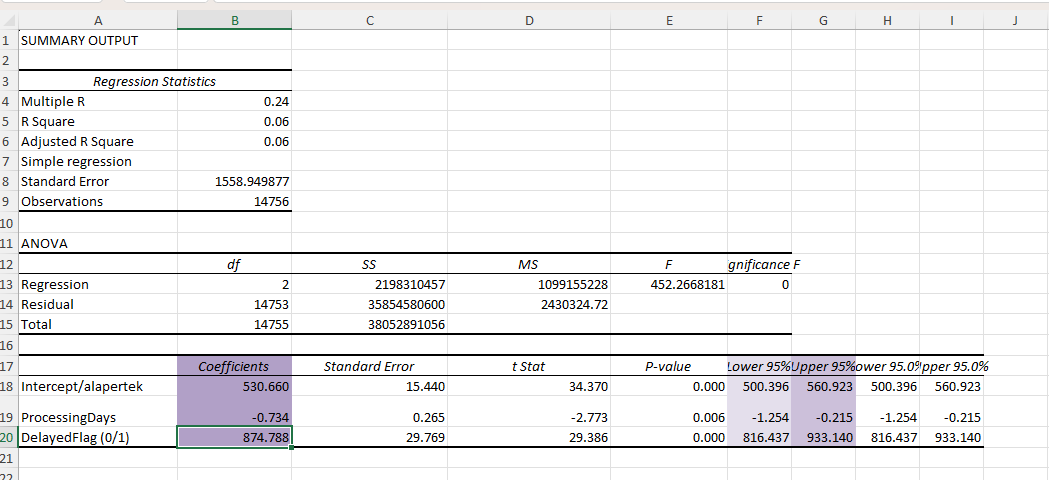
Predicted Invoice Amount = 530.66 – 0.734 × ProcessingDays + 874.788 × DelayedFlag
Interpretation
- Start at £530.66
Baseline invoice amount for a non‑delayed invoice with minimal processing time. - ProcessingDays: –£0.73 per day
A very small negative effect. Statistically significant due to the large dataset, but not practically meaningful. - DelayedFlag: +£875
Delayed invoices tend to be around £875 higher on average.
Example Prediction
For an invoice with:
- 12 processing days
- DelayedFlag = 1
[ 530.66 – (0.734 * 12) + 874.788 * 1 ]
This is the model’s predicted amount.
Model Performance
| Metric | Value |
|---|---|
| R² | 0.06 |
| Observations | 14,756 |
| Standard Error | 1558.95 |
The model is statistically significant, but the predictive power is low:
- R² = 0.06 → The model explains only 6% of the variation in invoice amounts.
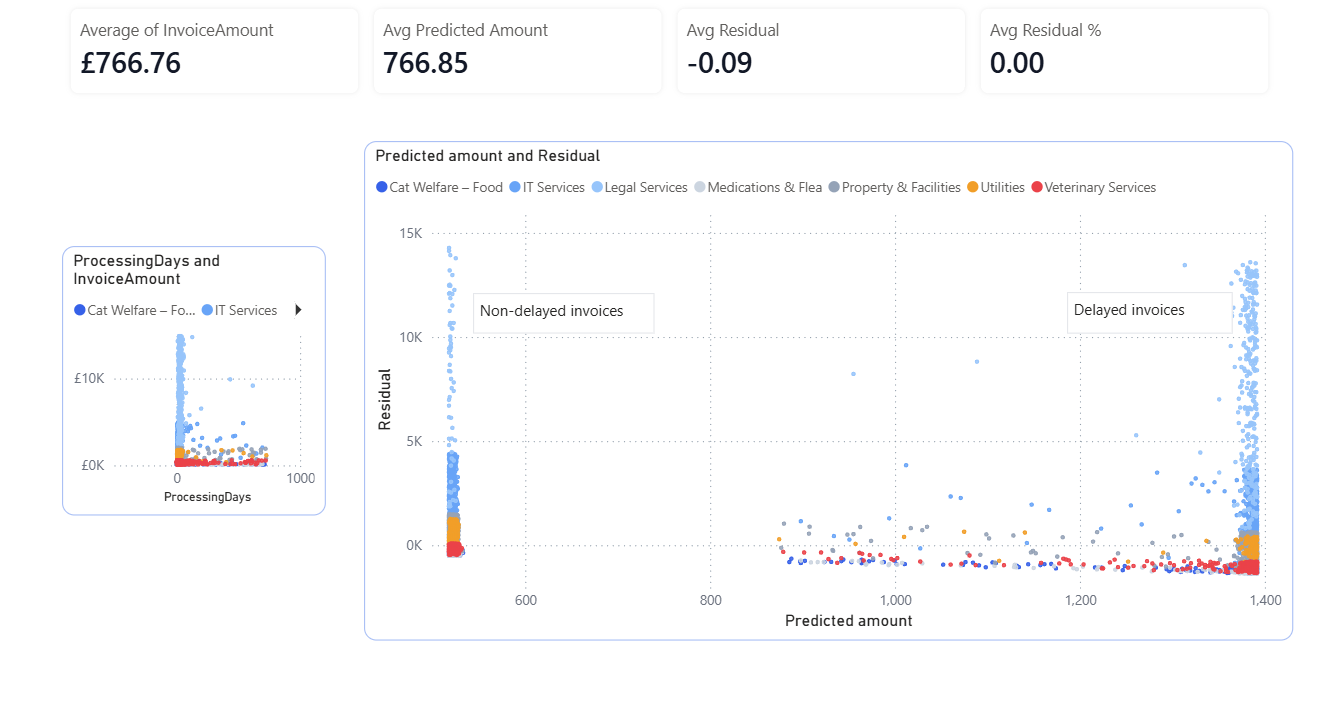
- Residuals show a wide vertical spread → Predictions are often far from actual values.
- Predicted amounts cluster between £500–£1,400 → Because the model only uses two simple variables.
This is expected for a simple model applied to complex financial data.
Visual Analysis
- Processing Days vs Invoice Amount
Shows no strong linear relationship — invoice amounts vary widely regardless of processing time.
- Predicted Amount vs Residual
Each dot = one invoice.
- X‑axis: model’s predicted amount
- Y‑axis: residual (error)
- Colours: invoice categories
The residuals are centred around zero (good), but spread out vertically (large errors).
This confirms the model is unbiased but not highly accurate.
Key Insights
Key Insights
• Delayed invoices tend to have higher average values
• Invoice values vary widely across departments
• Additional features (supplier, contract type, purchase order status) could significantly improve predictions