
Accounts Payable Insights
Visual Design, Usability & Security (RLS)
Project Context
This report is based on a fictional UK charity, Cats & Paw Care, created to reflect a realistic accounts payable environment within the animal welfare sector.
Cats & Paw Care works with a wide range of suppliers, including veterinary services, food and medication providers, property and facilities partners, as well as IT and legal services. As with many charities, timely invoice processing is essential to ensure smooth operations and uninterrupted care delivery.
The dataset and company scenario are fully fictional but inspired by real-world finance operations, allowing the project to focus on practical, business-relevant analytics while remaining portfolio-safe.
Introduction
After completing the initial data preparation phase — which involved cleaning, transforming, and modelling the raw AP dataset, along with building key DAX measures — this visual layer brings the insights to life through an interactive, user‑friendly Power BI report.
The goal of this stage was to translate the underlying data model into a clear, intuitive set of visuals that help finance teams monitor performance, diagnose delays, and understand vendor behaviour at both a high level and a detailed, invoice‑level view.
Visual Design
This stage focused on making the report feel calm, readable, and decision-ready. I used a light background, subtle borders, consistent spacing, and a limited colour palette to keep attention on the story rather than on decorative elements. Visual hierarchy was designed to work at a glance: headline KPIs at the top, trends and drivers in the middle, and detailed vendor-level information at the bottom.
KPI storytelling (MoM / YoY + targets)
Each KPI is supported with context so it’s not “just a number”. For volume metrics (Invoices, Backlog) I used MoM/YoY percentage change, while for rate metrics (Overdue %, Delayed %) I used percentage-point (pp) movement to avoid misleading interpretations. For operational performance, I added an Avg Processing Days target and clearly displayed variance (e.g., days over/under target) to turn the dashboard into an action-oriented tool.
Interactivity & drill experience
The main page is designed for quick scanning, with trend tabs to switch the focus between key metrics. To keep the report uncluttered while still supporting investigation, I added a drill-through page for vendor-level analysis. From a vendor or chart selection, users can open a detail view showing KPI context, delay reasons, processing-time trends, and invoice-level records—helping them move from insight to root cause in seconds.
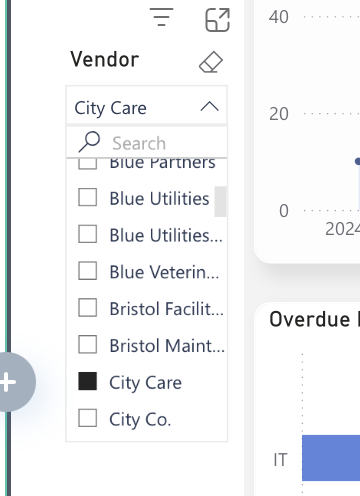
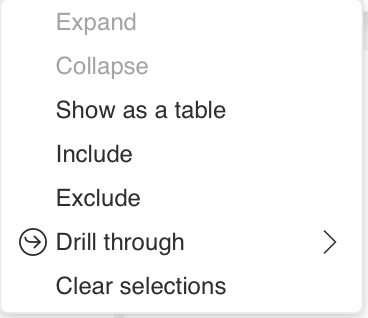
Select a vendor, then right-click and choose the Drill Through option.
Next Stage
To extend the project beyond reporting, I applied a basic regression model to examine whether processing time and delay status help explain invoice amount variability.